2019年7月28日日曜日

SQL で MP4 をパース

SQL でビットマップ画像の2値化は4年位前に挑戦した。
最近、それの Impala 版 を作ったときに閃いた。
「再帰CTEがあるなら、mp4 もいけるんじゃないか」と。
やってみた。

use ragingo

drop table video
go

create table video (
    type varchar(max) not null,
    data varbinary(max) not null
)
go

insert into video(type, data)
select
    'mp4' as type,
    BulkColumn as data
from
    openrowset(bulk N'D:\temp\videos\dst.mp4', SINGLE_BLOB) as video_data
go

drop synonym dbo.read_bytes
go

create synonym read_bytes for master.dbo.fn_varbintohexsubstring
go


with
    parse_boxes(size, type, current_offset, next_offset, data) as (
        select
            convert(int, convert(varbinary(max), dbo.read_bytes(1, data, 1, 4), 1)),
            convert(varchar(max), convert(varbinary(max), dbo.read_bytes(1, data, 1 + 4, 4), 1)),
            1,
            convert(int, convert(varbinary(max), dbo.read_bytes(1, data, 1, 4), 1)) + 1,
            data
        from
            video
        union all
        select
            convert(int, convert(varbinary(max), dbo.read_bytes(1, data, next_offset, 4), 1)),
            convert(varchar(max), convert(varbinary(max), dbo.read_bytes(1, data, next_offset + 4, 4), 1)),
            next_offset,
            (case convert(varchar(max), convert(varbinary(max), dbo.read_bytes(1, data, next_offset + 4, 4), 1))
                -- box      : 4 + 4 (size + type)
                -- full box : 4 + 4 + 4 (box + version 8bit + flag 24bit)
                when 'moov' then 4 + 4
                when 'trak' then 4 + 4
                when 'edts' then 4 + 4
                when 'mdia' then 4 + 4
                when 'minf' then 4 + 4
                when 'dinf' then 4 + 4
                when 'dref' then 4 + 4 + 4 + 4 -- data reference box : full box + 4 (entry count)
                when 'stbl' then 4 + 4
                when 'stsd' then 4 + 4 + 4 + 4 -- sample description box : full box + 4 (entry count)
                when 'udta' then 4 + 4
                when 'meta' then 4 + 4 + 4
                else convert(int, convert(varbinary(max), dbo.read_bytes(1, data, next_offset, 4), 1))
            end) + next_offset,
            data
        from
            parse_boxes
        where
            size is not null
    ),
    parse_avc1(size, type, current_offset, next_offset, data, width, height) as (
        select
            size,
            type,
            current_offset,
            next_offset,
            data,
            -- sample entry (6 + 2) + visual sample entry (2 + 2 + 4 * 3 + 2 (w) + 2 (h))
            convert(int, convert(varbinary(max), dbo.read_bytes(1, data, current_offset + 4 + 4 + 6 + 2 + 2 + 2 + 4 * 3, 2), 1)),
            convert(int, convert(varbinary(max), dbo.read_bytes(1, data, current_offset + 4 + 4 + 6 + 2 + 2 + 2 + 4 * 3 + 2, 2), 1))
        from
            parse_boxes
        where
            type = 'avc1'
    ),
    dump as (
        select
            size,
            type,
            current_offset - 1 as current_offset,
            next_offset - 1 as next_offset
        from
            parse_boxes
    )
select
    *
from
    dump
option (maxrecursion 100)
実行結果


2017年4月9日日曜日

メモ
Windows 10 Creators Update を入れた後、ストアが起動できなくなった

試行錯誤
・WSReset
・隠しフォルダにある一時ファイルを削除
・日時や言語を見直し
・再起動
・設定>アプリ>Store>詳細オプション に リセットボタンがあるから押す
→ アプリ名が"Store" から"ストア"に変わった。起動できるようになった。
→ Calendar と Calculator もおかしい。リセット前は起動できなかったが、リセットしたら起動できた。

2016年12月5日月曜日

持ち運び便利なシェーダー練習帳

HTML1枚にぎゅっと詰まったシェーダー練習帳

gist
https://gist.github.com/ragingo/e9edf399419dd90bd2894de9f48f6710


フラグメントシェーダーが終わったら、
今度は頂点シェーダーをやろう。

2016年11月22日火曜日

Hyper-V error 32788

Hyper-V の 仮想マシン起動時のエラー 32788 に苦しめられたけど、イベントログ見れば一瞬で解決できたのでメモ

イベントビューアー > アプリケーションとサービスログ > Microsoft > Windows > Hyper-V-****

今回は、「RemoteFX Manager プロセスを開始できませんでした」とあったから、「RemoteFx 3D ビデオ アダプター」を仮想マシンの設定から削除した。

2016年8月20日土曜日

Windows 版 iTunes のアップデートが失敗する事について調べた


1. まず 「windows itunes サーバーが見つからない」 で検索

2. https://discussionsjapan.apple.com/thread/10171836?start=0&tstart=0 がヒット

3. インターネットオプション「暗号化されたページをディスクに保存しない」 をオフにすると解決する事を知る

4. PowerShellスクリプトか何かをダブルクリックするだけで設定を切り替えたいから、インターネットオプションの「適用」ボタンを押した時に何が起こっているのかを調べる

5. Sysinternals Process Monitor を起動し、プロセス名でフィルタしてみる

6. 「Path」からそれっぽいのを探すと、「DisableCachingOfSSLPages」が見つかる

7. その行を選択してフィルタに追加する

8. チェックボックスを切り替えて「適用ボタン」を押す、という操作を繰り返す

9. 「DisableCachingOfSSLPages」で合ってた

10. 後はこれの値を更新するスクリプトを書くだけ


2016年2月14日日曜日

Windows Phone IP over USB Transport (IpOverUsbSvc) について

サービス「Windows Phone IP over USB Transport (IpOverUsbSvc)」が無いのに気づいた時点での開発環境
・Windows 7 -> Windows 10 へのアップグレード
・VS2010, VS2013, VS2015 インストール済み
・Windows Phone に関するもの(SDK等)はインストールした記憶無し

調べた結果
・Windows Phone SDK 8.0 をインストールする必要があった

疑問
・Windows 10 Mobile なのになんで Windows Phone SDK 8.0 をわざわざ入れないといけないのか

メモ
・Windows Phone SDK 8.0 のせいで無駄にSSDを4GBも使われた
・Windows Phone SDK 8.0 インストール完了時点で VS2012 が無いから幾つかエラーが表示されていた

2015年9月2日水曜日

SQLで画像処理(2値化)

以前やったSQLでの画像処理(2値化)です。
master.dbo.fn_varbintohexsubstring が遅すぎるから、そこだけ c# で対応しました。

処理前

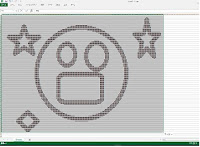
処理後(SSMS -> Excel)

use sample
go

------------------------------------
-- 入力画像データ格納テーブル
------------------------------------
/*
create table image_data(
    id int not null identity(1,1) constraint PK_image_data primary key,
    name varchar(100),
    data varbinary(max)
)
go
*/

-- C:\Windows\Web\Wallpaper\Theme1\smile1.jpg -> D:\dev\data\smile1.bmp

------------------------------------
-- 画像登録
------------------------------------
/*
insert into image_data(name, data)
select
    'smile1_24_192_120',
    (select * from openrowset(bulk N'D:\dev\data\smile1.bmp', SINGLE_BLOB) as bin)
go
*/

------------------------------------
-- 出力画像データ格納テーブル
------------------------------------
/*
create table result_image(
    pos int not null,
    row_index int not null,
    col_index int not null,
    pix int not null,
    constraint PK_result_image_rowcol primary key(row_index, col_index)
)
*/

------------------------------------
-- 前処理
------------------------------------
truncate table result_image
go

------------------------------------
-- ビットマップ情報取得
------------------------------------
with
    ------------------------------------
    -- 固定パラメータ
    ------------------------------------
    Param as (
        select name, convert(varchar(max), data, 2) as data, data as rawdata from image_data where name = 'smile1_24_192_120'
    ),
    ------------------------------------
    -- ビットマップファイルヘッダ
    ------------------------------------
    BITMAPFILEHEADER as (
        select
            convert(char(2), dbo.Collection_Range(p.rawdata, 0, 2)) as bfType,
            convert(int, dbo.Collection_Reverse(dbo.Collection_Range(p.rawdata,  2, 4))) as bfSize,
            convert(int, dbo.Collection_Reverse(dbo.Collection_Range(p.rawdata,  6, 2))) as bfReserved1,
            convert(int, dbo.Collection_Reverse(dbo.Collection_Range(p.rawdata,  8, 2))) as bfReserved2,
            convert(int, dbo.Collection_Reverse(dbo.Collection_Range(p.rawdata, 10, 4))) as bfOffBits
        from
            Param as p
    ),
    ------------------------------------
    -- ビットマップ情報ヘッダ
    ------------------------------------
    BITMAPINFOHEADER as (
        select
            convert(int, dbo.Collection_Reverse(dbo.Collection_Range(p.rawdata, 14, 4))) as biSize,
            convert(int, dbo.Collection_Reverse(dbo.Collection_Range(p.rawdata, 18, 4))) as biWidth,
            convert(int, dbo.Collection_Reverse(dbo.Collection_Range(p.rawdata, 22, 4))) as biHeight,
            convert(int, dbo.Collection_Reverse(dbo.Collection_Range(p.rawdata, 26, 2))) as biPlanes,
            convert(int, dbo.Collection_Reverse(dbo.Collection_Range(p.rawdata, 28, 2))) as biBitCount,
            convert(int, dbo.Collection_Reverse(dbo.Collection_Range(p.rawdata, 30, 4))) as biCopmression,
            convert(int, dbo.Collection_Reverse(dbo.Collection_Range(p.rawdata, 34, 4))) as biSizeImage,
            convert(int, dbo.Collection_Reverse(dbo.Collection_Range(p.rawdata, 38, 4))) as biXPixPerMeter,
            convert(int, dbo.Collection_Reverse(dbo.Collection_Range(p.rawdata, 42, 4))) as biYPixPerMeter,
            convert(int, dbo.Collection_Reverse(dbo.Collection_Range(p.rawdata, 46, 4))) as biClrUsed,
            convert(int, dbo.Collection_Reverse(dbo.Collection_Range(p.rawdata, 50, 4))) as biCirImportant
        from
            Param as p
    ),
    ------------------------------------
    -- ビットマップ情報全体
    ------------------------------------
    BitmapInfo as (
        select
            bf.*,
            bi.*,
            (bi.biBitCount/8 * bi.biWidth * bi.biHeight) as PixelCount
        from
            BITMAPFILEHEADER bf,
            BITMAPINFOHEADER bi
    ),
    ------------------------------------
    -- ピクセル数分のシーケンス生成
    ------------------------------------
    Seq(rowIndex, maxRowCount) as (
        select 0, (select PixelCount from BitmapInfo)
        union all
        select
            rowIndex+1, maxRowCount
        from
            Seq
        where
            rowIndex < maxRowCount
    ),
    ------------------------------------
    -- 各ピクセルのRGBを取得
    ------------------------------------
    RawPixels as (
        select
            s.rowIndex as pos,
            round(s.rowIndex / i.biWidth, 0) as row_index,
            s.rowIndex % i.biWidth as col_index,
            1 as alpha,
            dbo.Collection_Reverse(dbo.Collection_Range(p.rawdata, i.bfOffBits + (s.rowIndex * 3) + 0, 1)) as red,
            dbo.Collection_Reverse(dbo.Collection_Range(p.rawdata, i.bfOffBits + (s.rowIndex * 3) + 1, 1)) as green,
            dbo.Collection_Reverse(dbo.Collection_Range(p.rawdata, i.bfOffBits + (s.rowIndex * 3) + 2, 1)) as blue,
            i.*
        from
            Param as p,
            Seq as s,
            BitmapInfo i
        where
            s.rowIndex < s.maxRowCount / 3
    ),
    ------------------------------------
    -- 固定パラメータ
    ------------------------------------
    BinarizationParam as (
        select 160 as threshold
    ),
    ------------------------------------
    -- 2値化
    ------------------------------------
    Binarization as (
        select
            p.pos,
            p.row_index,
            p.col_index,
            (case
                when p.red < BinarizationParam.threshold then 0
                when p.green < BinarizationParam.threshold then 0
                when p.blue < BinarizationParam.threshold then 0
                else 1
            end) as pix
        from
            RawPixels as p,
            BinarizationParam
    )
insert into
    result_image
select
    *
from
    Binarization

option (maxrecursion 0)


------------------------------------
-- 列名一覧作成
------------------------------------
declare @col_list varchar(max) = ''

select
    @col_list = 
        @col_list +
        (case when len(@col_list) > 0 then ',' + char(13) else '' end) +
        '(case ' +
            'when max(case when col_index = ' + cast(col_index as varchar(max)) + ' then pix else 0 end) = 1 then ' +
                ''''' ' +
            'else ' +
                '''■'' ' +
        'end) as c' + cast(col_index as varchar(max))
from
    result_image
group by
    col_index
order by
    col_index

------------------------------------
-- 出力
------------------------------------
declare @sql varchar(max) =
    'select ' + char(13) +
        'row_index as r,' + char(13) +
        @col_list + char(13) +
    'from ' + char(13) +
        'result_image ' + char(13) +
    'group by row_index ' + char(13) +
    'order by row_index desc'

--print @sql
execute sp_sqlexec @sql

go

SQL で MP4 をパース

SQL でビットマップ画像の2値化は4年位前に挑戦した。 最近、それの Impala 版 を作ったときに閃いた。 「再帰CTEがあるなら、mp4 もいけるんじゃないか」と。 やってみた。 use ragingo drop table video go create...